
Connect your device
Connect a smartphone or tablet wirelessly to the projector.
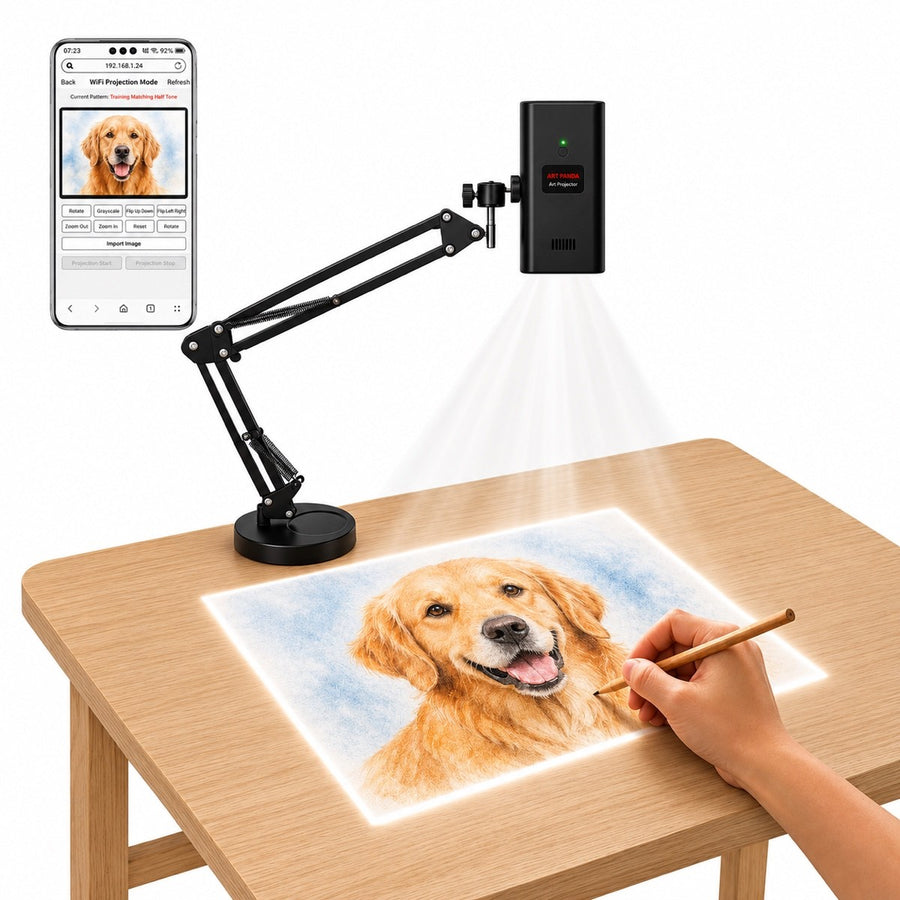
Turn phone photos, sketches, and patterns into tracing guides
Secure checkout - Tracking number provided
When recreating a reference by eye makes it hard to get the outline started, project a photo, sketch, or pattern from your phone or tablet as a guide. Connect wirelessly, scale or rotate the image in your phone’s browser, then position the projector arm for drawing, painting, lettering, or crafts.
When a reference is right there on your phone, getting its outline onto paper can still be the hard part. The projector places the image in view as you draw, giving you a visible starting point for turning a photo or sketch into your own work.
Color: Black
Power: USB-C
Shipping options are shown at checkout. See our shipping and return policies for details.
Connect a smartphone or tablet wirelessly. Choose a photo, sketch, or pattern, then use the phone-browser controls to scale or rotate it. Adjust the arm’s height, distance, and angle to position the projection, then trace the image.

When you want to draw from a photo, sketch, or pattern, recreating its outline by eye can mean working out the image as well as the drawing. Connect a phone or tablet wirelessly and project that reference onto your work surface. Follow the projected image as a guide while you draw, paint, or trace lettering.
Get the Art Tracing Projector ↗
Use the controls in your phone’s browser to scale or rotate the image before you begin; no app download is required. Then adjust the projector’s 360° arm to change its height, distance, and angle. The angle-locking structure lets you set the arm in position for your chosen drawing setup.
Get the Art Tracing Projector ↗
Position the projector for tabletop drawing or easel sketching, or use a projected reference for canvas painting, wall murals, lettering, and crafts. A phone or tablet image gives you a guide to work from, whether you’re practicing a drawing or bringing a design onto another project surface.
Get the Art Tracing Projector ↗Connect a smartphone or tablet wirelessly to the projector.
Select a photo, sketch, or pattern, then use your phone’s browser controls to scale or rotate it.
Adjust the arm’s height, distance, and angle, then trace the projected guide.
When recreating a reference by eye makes it hard to get the outline started, project a photo, sketch, or pattern from your phone or tablet as a guide. Connect wirelessly, scale or rotate the image in your phone’s browser, then position the projector arm for drawing, painting, lettering, or crafts.
Color: Black
Power: USB-C
Shipping options are shown at checkout. See our shipping and return policies for details.
Not satisfied for any reason? Return it within 30 days for your money back. No questions asked.
Our friendly customer service team is here to help 24/7. Before you buy or after it arrives, you're always welcome to reach out.